You can view the source code for this project by following this link: GitHub
The problem
Every service in home lab is a Docker Compose stack with a pinned image tag:
services: immich-server: image: ghcr.io/immich-app/immich-server:v3.3.5 # rest of config
homeassistant: image: ghcr.io/home-assistant/home-assistant:2026.10.2 # rest of config
grafana: image: grafana/grafana:13.2.4 # rest of configNow, to get info about new version, I would have to manually check each image’s repository for updates. With ~40 containers across a many different compose files, “check for updates” means visiting a dozen GitHub release pages.
Potential solutions
The usual answer is Watchtower - a container that pulls new images and restarts containers automatically. But that goes against the principle of pinning: I don’t want my containers to update automatically. I just want to be informed about new versions. What is more, I have no idea which version each container is currently running without inspecting the compose files or querying the Docker daemon.
Also there are problems with breaking changes: if an image updates automatically, it might introduce changes that are incompatible with my setup. At the end, backup strategy is the critical part: if an image updates automatically and breaks something, I need a way to roll back to a known good state.
Human-in-the-loop approach
The idea is to have a system that monitors for updates but leaves the decision-making to the human operator. This way, I can stay informed about new versions without risking automatic updates that might break my setup.
The expected solution is to have a tool that continuously monitors the Docker environment for updates and reports them, while leaving the actual update process to the human operator. Because I am using pinned tags for my containers (in docker-compose files), I need a tool that can detect updates and can apply them automatically to the compose files, but only when I decide to do so.
What WUD is
After some research and experimentation, I found that WUD perfectly fits the human-in-the-loop approach I described above.
WUD (What’s Up Docker, source on GitHub) is a single container that:
- Watches the Docker daemon through the socket and lists every running container with its image and tag.
- Looks up each image in its registry (Docker Hub, GHCR, LSCR, Quay and many more are built in) and compares the running tag with the tags available upstream.
- Reports the result through a REST API, and optionally through triggers - SMTP, Slack, Telegram, MQTT and others.
The important part is what it doesn’t do by default: it never pulls, never restarts, never edits a file. It only detects. For a pinned-tag setup that’s exactly the right split.
The setup
Following the convention from the earlier parts of this series, it gets its own folder with its own docker-compose.yml:
services: wud: container_name: wud image: getwud/wud:9.5.0 volumes: - /var/run/docker.sock:/var/run/docker.sock:ro - ./wud/store:/store restart: unless-stopped environment: - WUD_WATCHER_LOCAL_CRON=0 6 * * * - WUD_AUTH_ADMIN_USER=${WUD_ADMIN_USER} - WUD_AUTH_ADMIN_PASSWORD=${WUD_ADMIN_PASSWORD}What it looks like in practice
Start the stack and WUD lists every container on the host with its current tag, flagging the ones with a newer version available. The data is exposed through the API, which is what the rest of this post builds on. A trimmed response for one container that has an update pending:
{ "name": "homeassistant", "watcher": "local", "updateAvailable": true, "updateKind": { "kind": "tag", "localValue": "2026.10.2", "remoteValue": "2026.10.3", "semverDiff": "patch" }, "image": { "name": "homeassistant/home-assistant", "tag": { "value": "2026.10.2", "semver": true } }, "result": { "tag": "2026.10.3" }, "labels": { "com.docker.compose.service": "homeassistant", "com.docker.compose.project.config_files": "smart-home/docker-compose.yml" }}Two parts of that response worth to mention:
updateKind.semverDiffsays how big the jump is -patch,minorormajor. That’s the number that decides whether I read release notes first.labelscontains thecom.docker.compose.*labels that Docker Compose attaches to every container it creates. They hold the exact path of the compose file that created the container. That’s a free mapping from “this container is outdated” to “this is the file to edit”.
Omit pre-release tags
Out of the box WUD recommends the newest tag it can find, and registries are full of tags that aren’t releases: dev, rc, nightly, -ubuntu variants, an immich tag with an -openvino suffix. Two labels on the container filter them at the source:
portainer: image: portainer/portainer-ce:2.45.3-alpine labels: # Only track the -alpine variant; ignore plain tags like 2.42.0. - wud.tag.include=^\d+\.\d+\.\d+-alpine$$
immich-machine-learning: image: ghcr.io/immich-app/immich-machine-learning:v3.3.5-openvino labels: # track only the -openvino variant; ignore plain tags like v3.3.5. - wud.tag.include=^v\d+\.\d+\.\d+-openvino$$wud.tag.include is a regex that a tag has to match to be considered, and wud.tag.exclude removes tags that match.
The doubled $$ is Compose escaping, not part of the regex. Compose treats a single $ as the start of a variable,
so $$ is how you write a literal $ in a label value. Inside the container the regex ends with a plain $.
From “update available” to a compose diff
Now the problem is half solved. I don’t want automatic updates and I don’t want latest (or any floating tag), so the only way to apply an update is to bump the version in the compose file myself. The flow is simple:
- Ask WUD what is out of date.
- Based on the response, bump the version in the right compose file.
With ~40 containers that is a long, boring job, and the kind of thing that stops happening.
So I wrote a script that does it. It’s a small Bash script (jq, curl, perl) that lives in the same repository as the compose files, and it does exactly this:
- Asks the WUD API for the list of containers.
- For every outdated one, finds the compose file, the service and the old version.
- Replaces the old version with the new one in that file.
- Prints the command to deploy the change - it never pulls images or restarts anything.
🔎 Querying WUD ...
📦 Updates available: # CONTAINER FILE CHANGE 1 homeassistant smart-home/docker-compose.yml home-assistant:2026.10.2 → home-assistant:2026.10.3That’s real output from the server. As you can see, it lists the container, the compose file, and the change from the old tag to the new one. What is more I can run interactive updates with the script, selecting which updates to apply and which to skip.
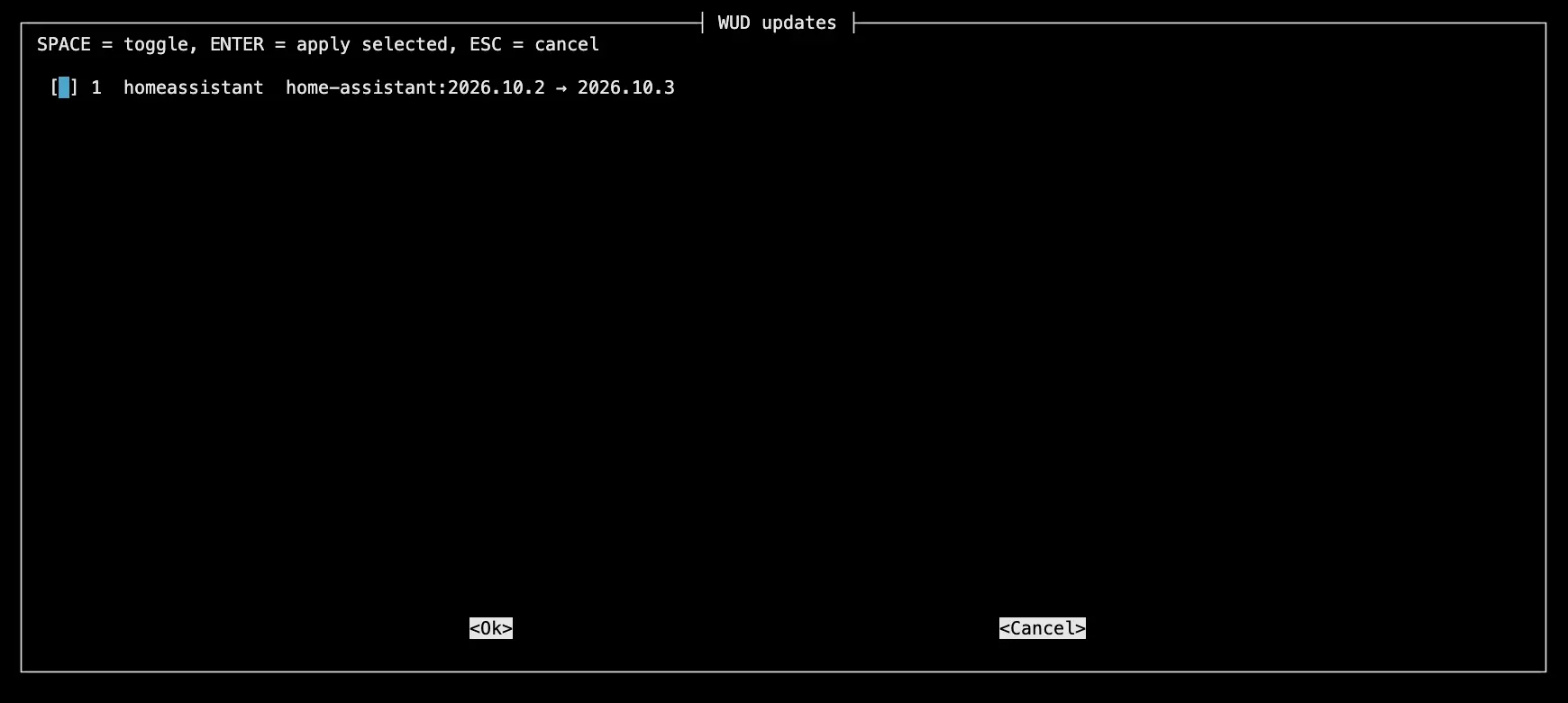
The script can be run with flag --dry-run to show only the list of updates without applying them.
Because the whole apps folder is a git repository, the result is an ordinary diff - that’s the review step:
Review first with: git diff -- '*docker-compose*'
🚀 To pull and redeploy the updated services: docker compose -f "smart-home/docker-compose.yml" up -d --pull always homeassistantIf the changes look fine, I run the printed docker compose command, check that the service came back healthy and commit.
The final solution
- Every day at 06:00, WUD scans the host and updates its list of available container updates.
- When I have a few minutes - I run the script to check for available updates and apply them selectively.
- Run back-ups if necessary - Before applying updates, ensure that I have recent backups.
- After applying updates - I review the changes, run the necessary
docker composecommands, and commit the updates to the repository.

