You can view the source code for this project by following this link: GitHub
The problem
Every service in home lab is a Docker Compose stack with a pinned image tag - immich-server:v3.3.5, home-assistant:2026.10.2, grafana:13.2.4.
The cost of pinning is that nothing tells you a new version exists.
With ~40 containers across a many different compose files, “check for updates” means visiting a dozen GitHub release pages.
The usual answer is Watchtower - a container that pulls new images and restarts containers automatically. That’s the opposite of what pinning is for. I want something that tells me what’s outdated and leaves the decision to me.
What WUD is
WUD (What’s Up Docker, source on GitHub) is a single container that:
- Watches the Docker daemon through the socket and lists every running container with its image and tag.
- Looks up each image in its registry (Docker Hub, GHCR, LSCR, Quay and many more are built in) and compares the running tag with the tags available upstream.
- Reports the result through a REST API, and optionally through triggers - SMTP, Slack, Telegram, MQTT and others.
The important part is what it doesn’t do by default: it never pulls, never restarts, never edits a file. It only detects. For a pinned-tag setup that’s exactly the right split.
WUD understands two kinds of update. A tag update means a newer version exists (2026.10.2 → 2026.10.3). A
digest update means the same tag now points to a different image - what happens to latest or 3 style tags when
the maintainer rebuilds. With pinned semver tags, almost everything is a tag update, which is also the only kind that
can be applied by editing a compose file.
The setup
Following the convention from the earlier parts of this series, it gets its own folder with its own docker-compose.yml:
services: wud: container_name: wud image: getwud/wud:9.5.0 volumes: - /var/run/docker.sock:/var/run/docker.sock:ro - ./wud/store:/store restart: unless-stopped environment: - TZ=Europe/Warsaw - WUD_WATCHER_LOCAL_CRON=0 6 * * * - WUD_AUTH_ADMIN_USER=${WUD_ADMIN_USER} - WUD_AUTH_ADMIN_PASSWORD=${WUD_ADMIN_PASSWORD}What each block does:
- The Docker socket, read-only. This is how WUD sees the other containers.
:rostops WUD from writing to the socket file itself, but a process with socket access can still read everything about every container - including environment variables. Treat it as a privileged container. ./wud/storekeeps WUD’s state (a SQLite database) across restarts, so it remembers what it already reported.WUD_WATCHER_LOCAL_CRON=0 6 * * *- thelocalwatcher is the Docker daemon on this machine, and this is a plain cron expression: scan every day at 06:00. Registry lookups are rate limited on some registries, so once a day is plenty.WUD_AUTH_ADMIN_*- WUD 9 requires authentication, so the API is behind basic auth. The values come from a.envfile next to the compose file, which stays out of git.
What it looks like in practice
Start the stack and WUD lists every container on the host with its current tag, flagging the ones with a newer version available. The data is exposed through the API, which is what the rest of this post builds on. A trimmed response for one container that has an update pending:
{ "name": "homeassistant", "watcher": "local", "updateAvailable": true, "updateKind": { "kind": "tag", "localValue": "2026.10.2", "remoteValue": "2026.10.3", "semverDiff": "patch" }, "image": { "name": "homeassistant/home-assistant", "tag": { "value": "2026.10.2", "semver": true } }, "result": { "tag": "2026.10.3" }, "labels": { "com.docker.compose.service": "homeassistant", "com.docker.compose.project.config_files": "smart-home/docker-compose.yml" }}Two parts of that response worth to mention:
updateKind.semverDiffsays how big the jump is -patch,minorormajor. That’s the number that decides whether I read release notes first.labelscontains thecom.docker.compose.*labels that Docker Compose attaches to every container it creates. They hold the exact path of the compose file that created the container. That’s a free mapping from “this container is outdated” to “this is the file to edit”.
Omit pre-release tags
Out of the box WUD recommends the newest tag it can find, and registries are full of tags that aren’t releases: dev, rc, nightly, -ubuntu variants, an immich tag with an -openvino suffix. Two labels on the container filter them at the source:
portainer: image: portainer/portainer-ce:2.45.3-alpine labels: # Only track the -alpine variant; ignore plain tags like 2.42.0. - wud.tag.include=^\d+\.\d+\.\d+-alpine$$
immich-machine-learning: image: ghcr.io/immich-app/immich-machine-learning:v3.3.5-openvino labels: # track only the -openvino variant; ignore plain tags like v3.3.5. - wud.tag.include=^v\d+\.\d+\.\d+-openvino$$wud.tag.include is a regex that a tag has to match to be considered, and wud.tag.exclude removes tags that match.
The doubled $$ is Compose escaping, not part of the regex. Compose treats a single $ as the start of a variable,
so $$ is how you write a literal $ in a label value. Inside the container the regex ends with a plain $.
The rule I follow: fix noise in WUD, not in the script. The tag WUD recommends is the single source of truth for what “newer” means, and every consumer of the API - the mail, the script - sees the same answer.
From “update available” to a compose diff
Now the problem is half solved. I don’t want automatic updates and I don’t want latest (or any floating tag), so the only way to apply an update is to bump the version in the compose file myself. The flow is simple:
- Ask WUD what is out of date.
- Based on the response, bump the version in the right compose file.
With ~40 containers that is a long, boring job, and the kind of thing that stops happening. So I wrote a script that does it. It’s a small Bash script (jq, curl, perl) that lives in the same repository as the compose files, and it does exactly this:
- Asks the WUD API for the list of containers.
- For every outdated one, finds the compose file, the service and the old version. WUD gives all three: the new tag in
result.tag, the old one inupdateKind.localValue, and the compose file path in thecom.docker.compose.*labels. Onlytagupdates are used, because a digest-only update has no new tag to write into a file. - Replaces the old version with the new one in that file - after checking that the old
image:tagreally is there. If it isn’t (for example I already edited the file but didn’t redeploy), the container is skipped with a warning. The script never edits a file on a guess. - Prints the command to deploy the change - it never pulls images or restarts anything.
🔎 Querying WUD ...
📦 Updates available: # CONTAINER FILE CHANGE 1 homeassistant smart-home/docker-compose.yml home-assistant:2026.10.2 → home-assistant:2026.10.3
⚠️ Skipped (current tag not found in compose — running container may be out of sync): authelia looked for authelia:4.39.14 in authelia/docker-compose.ymlThat’s real output from the server. The Authelia warning is the script doing its job: the running container is on 4.39.14, the compose file already says something else, and the script leaves it alone until I redeploy and sort that out.
Without flags the script opens a checkbox list where I pick which updates to apply - space toggles, enter applies, escape cancels:
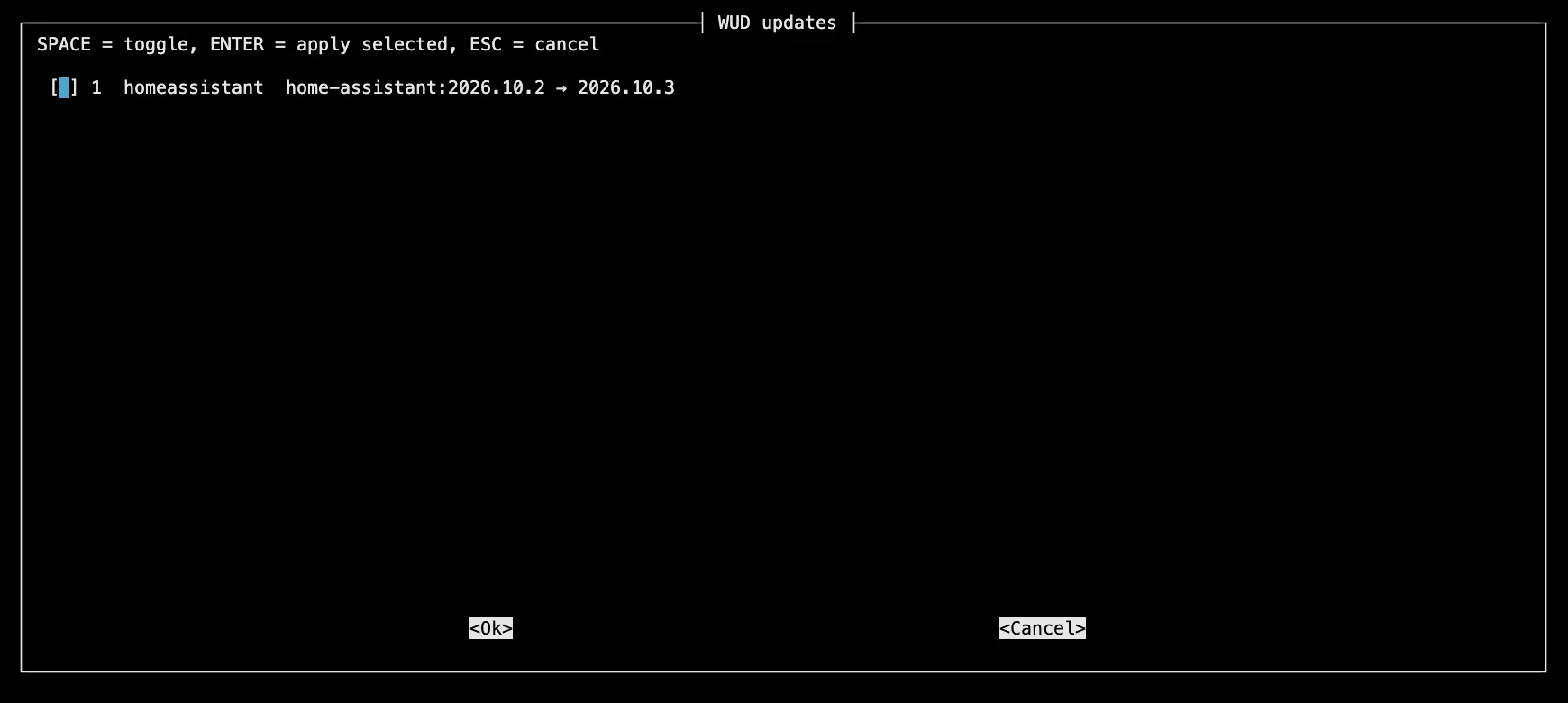
--dry-run only shows the list and --yes applies everything without asking.
Because the whole apps folder is a git repository, the result is an ordinary diff - that’s the review step:
Review first with: git diff -- '*docker-compose*'
🚀 To pull and redeploy the updated services: docker compose -f "smart-home/docker-compose.yml" up -d --pull always homeassistantIf the diff looks fine, I run the printed docker compose command, check that the service came back healthy and commit.
The routine
- 06:00 - WUD scans the host and updates its list.
- When I have a few minutes - run the script with
--dry-runto see the list, then again to select what I want now. - Read the release notes for anything where
semverDiffisn’tpatch, review the diff, run the printeddocker compose ... up -d --pull always <service>, and commit.
Updating one stack at a time, with a diff to read and a git history to revert, is slower than Watchtower and that’s the point: when Immich gets a bad release, I find out about it because I ran the update, and git revert plus one docker compose up puts it back.

