You can view the source code for this project by following this link: GitHub
The problem
Exposing a home lab to the internet means Caddy’s access log fills up with more than just real visitors. The moment yourdomain.com resolves to a public IP, it gets found by mass scanners within hours - probes for /wp-login.php, .env files, .git/config, Log4Shell headers, ThinkPHP and Jira RCE paths, all automated and constant, whether or not anything at that domain runs PHP, Java, or a CMS at all.
Caddy’s own reverse_proxy doesn’t care about any of this - it forwards a request to the upstream service exactly as well whether it’s a browser or a scanner. Logging the noise (see the monitoring setup) tells you it’s happening; it doesn’t stop it.
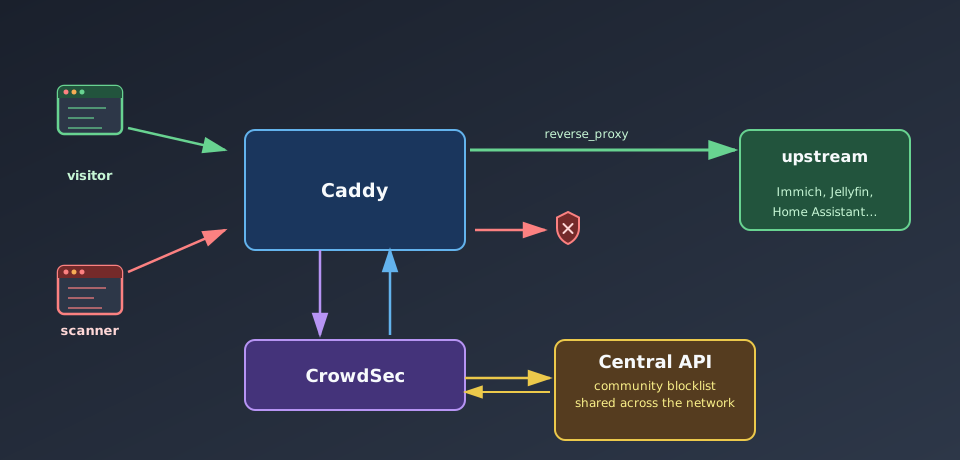
CrowdSec closes that gap: it reads the same access log, recognizes attack patterns, and hands Caddy a list of IPs to reject - before they ever reach Immich, Jellyfin, or anything else behind it.
What CrowdSec actually is
CrowdSec is an open-source IPS modeled on fail2ban but built for structured log parsing instead of regex-on-syslog:
- Parsers turn a raw log line (Caddy’s JSON access log, in this case) into structured events.
- Scenarios describe an attack pattern over those events - e.g. “N distinct sensitive-file requests from the same IP within Y minutes” - and fire an alert when matched.
- Decisions are the enforcement output of a triggered scenario - almost always “ban this IP for N hours.”
- Bouncers are the components that actually enforce decisions somewhere - the Caddy plugin used here, but also nginx, iptables, and others.
The part that makes it more than a local fail2ban clone is CAPI - CrowdSec’s Central API. Every participating instance can opt in to share anonymized attack signals (attacking IP, scenario matched, no request bodies or personal data), and in exchange pulls down a community blocklist of IPs every other participant has already flagged. In practice this means most mass scanners get banned on first contact, since someone else on the network has already seen and reported them.
CrowdSec’s biggest advantage is that it runs on a community model (Crowd Security): if a bot scans another user’s server on the network, its IP lands in the shared CAPI blocklist - so this home lab can block it immediately, before that bot ever gets to send a first request here.
This is the same trust trade-off as Cloudflare, just inverted: nothing here decrypts or proxies your traffic through a third party, only attack metadata (IP, matched rule, timestamp) is shared outbound. Sharing can be disabled entirely and CrowdSec still works using local scenarios only - the enrolled network effect is what turns “ban after it happens to you” into “ban because it happened to someone else first.”
The setup
1. A custom Caddy build
CrowdSec’s Caddy integration ships as an unofficial plugin, so stock Caddy doesn’t have it - it needs building in with xcaddy:
FROM caddy:2.11.2-builder AS builder
RUN xcaddy build \ --with github.com/mholt/caddy-l4 \ --with github.com/caddyserver/transform-encoder \ --with github.com/hslatman/caddy-crowdsec-bouncer/http@main \ --with github.com/hslatman/caddy-crowdsec-bouncer/layer4@main
FROM caddy:2.11.2
COPY --from=builder /usr/bin/caddy /usr/bin/caddyTwo variants of the plugin get built in: http for the reverse proxy directive used here, and layer4 for bouncing at the TCP/UDP level via caddy-l4 (not used in this setup, but no extra cost to include).
2. CrowdSec next to Caddy
services: caddy: build: context: . target: caddy ports: - "80:80" - "443:443" volumes: - ./caddy/conf:/etc/caddy - ./caddy/logs:/var/log/caddy depends_on: - crowdsec networks: - reverse-proxy - crowdsec env_file: - .env
crowdsec: image: crowdsecurity/crowdsec:v1.7.8 environment: - COLLECTIONS=crowdsecurity/caddy crowdsecurity/base-http-scenarios crowdsecurity/http-cve - BOUNCER_KEY_CADDY=${CROWDSEC_API_KEY} volumes: - ./crowdsec/config:/etc/crowdsec - ./crowdsec/data:/var/lib/crowdsec/data - ./caddy/logs:/var/log/caddy:ro networks: - crowdsec
networks: reverse-proxy: name: reverse-proxy crowdsec: driver: bridgeCOLLECTIONS is the important line - it pulls in ready-made parser/scenario bundles from the CrowdSec hub instead of writing detection rules by hand: crowdsecurity/caddy teaches it to parse Caddy’s JSON log format, crowdsecurity/base-http-scenarios adds generic HTTP abuse detection (probing, bad user agents, path traversal, brute force), and crowdsecurity/http-cve adds pattern matches for a long list of known CVE exploit attempts (Log4Shell, Spring4Shell, ThinkPHP, Jira, F5 BIG-IP, and dozens more).
CrowdSec only needs read access to caddy/logs - it never touches the request path directly, it just tails the same file Caddy is already writing to.
BOUNCER_KEY_CADDY isn’t invented locally - it’s registered against CrowdSec’s local API first, with cscli bouncers add caddy-bouncer, which prints the key to put in .env. Registering it any other way (or reusing a key) just gets
that bouncer rejected on its next poll.
3. Wiring the bouncer into Caddy
{ order crowdsec first
crowdsec { api_url http://crowdsec:8080 api_key {$CROWDSEC_API_KEY} }}
yourdomain.com, *.yourdomain.com { crowdsec
@photos host photos.yourdomain.com handle @photos { reverse_proxy immich:2283 }
# ... other subdomains}order crowdsec first in the global block makes the bouncer the very first thing that runs on every request, ahead of routing or the reverse proxy itself - a banned IP gets a 403 before Caddy even decides which upstream it was asking for. The crowdsec line inside the site block is what actually turns the check on for that domain.
Under the hood the plugin defaults to polling CrowdSec’s local API every 60 seconds and caching the decision list in memory (stream mode), rather than making a network call per request - a banned IP is rejected from the in-memory cache, not by querying CrowdSec live each time. That trade-off means a newly-banned IP can slip through for up to a minute after the ban is created, in exchange for zero added latency on every request.
4. Optional: banning a whole country
CrowdSec already resolves the origin country of every alert via GeoIP - the same crowdsec/data directory that ships the attack signature lists also bundles GeoLite2-City.mmdb and GeoLite2-ASN.mmdb, and an s00-enrich postoverflow stage attaches the resolved country code to Alert.Source.Cn before the alert ever reaches a profile. That makes country-based banning a profiles.yaml rule, not a separate integration:
name: geofencing_profilefilters: - Alert.Remediation == true && Alert.GetScope() == "Ip" && Alert.Source.Cn != "PL"decisions: - type: ban duration: 24hon_success: breakAny IP-scoped alert whose GeoIP country isn’t PL gets a flat 24-hour ban, regardless of which scenario actually fired. on_success: break stops the profile pipeline there, so this rule doesn’t also fall through to whatever the default profile would otherwise have decided.
This is a whitelist, not a blacklist - for a home lab domain with no legitimate reason to be reached from outside its own country, banning everything except the one country real traffic comes from blocks a much larger slice of the noise in a single rule than blacklisting individual countries ever would.
What it actually caught
A week of exposure gives cscli metrics something to show. Scenarios that fired against this specific server:
| Scenario | Hits |
|---|---|
http-probing | 40 |
http-crawl-non_statics | 30 |
http-admin-interface-probing | 28 |
http-wordpress-scan | 26 |
http-backdoors-attempts | 14 |
| everything else (bad user agents, sensitive-file probes, tech fingerprinting, Jira/Log4Shell/ThinkPHP/Pulse Secure CVE probes) | 40 |
None of those services are actually running here - no WordPress, no Jira, no ThinkPHP, no Pulse Secure VPN. Every hit is a scanner trying its luck against a domain it knows nothing about.
The decision counts make the CAPI network effect obvious:
| Reason | Origin | Action | Count |
|---|---|---|---|
http:scan | CAPI | ban | 29,952 |
http:exploit | CAPI | ban | 703 |
http:bruteforce | CAPI | ban | 353 |
http:crawl | CAPI | ban | 91 |
| local scenarios (probing, wordpress-scan, backdoors, admin-interface, crawl) | crowdsec | ban | 3 each |
Locally-detected bans are a handful - this one server simply hasn’t been probed enough times yet to trigger its own thresholds for most scenarios. The other ~31,000 bans came pre-loaded from CAPI: IPs the wider CrowdSec community had already flagged for the exact same behavior elsewhere, blocked here on first contact instead of after this server got probed enough times to notice on its own.
Acquisition metrics tell the same story from a different angle: of ~32.7k Caddy log lines parsed, ~8k got whitelisted
outright (the whitelist-good-actors collection excludes known-good crawlers like Googlebot’s real IP ranges from
ever being scored as an attacker), and ~22.6k were poured into scenario buckets for evaluation. Whitelisting matters
as much as detection - without it, legitimate search engine indexing looks identical to a slow crawl scenario.
What it isn’t
CrowdSec is behavior-based blocking derived from log lines, not a full WAF (Web Application Firewall - a layer that inspects individual request contents, like headers, bodies, and query strings, against rules to block malicious payloads before they reach the app) - it doesn’t inspect request bodies, doesn’t terminate and re-parse TLS, and won’t catch a one-shot exploit that doesn’t match a known scenario pattern or repeat often enough to cross a threshold. It also does nothing about raw request volume by itself; pairing it with Caddy’s own rate_limit directive covers the case CrowdSec’s threshold-based scenarios are slower to react to.
That last point is really a consequence of what CrowdSec fundamentally is: a log analyzer, not an inline traffic inspector. Caddy writes the access log entry for a request, then CrowdSec’s log-tailer picks it up, parses it, and evaluates it against scenarios - the request itself has already been forwarded to the upstream service by the time any of that happens. For a scenario like http-wordpress-scan that needs “N distinct /wp-* paths from the same IP within Y minutes”, the first handful of those paths are, by construction, let through while the count is still below N - the ban only exists once the pattern is already established.
This isn’t a shortcoming so much as the trade-off that makes CrowdSec work at all - scoring single requests in isolation can’t distinguish a scanner’s first probe from a real visitor’s first request; only a pattern across several requests can. That’s exactly why the CAPI blocklist matters so much in the numbers above: for the ~31,000 CAPI-sourced bans, someone else’s server already paid the cost of that first probe long before this one did, so on this server the ban is live before a first request ever arrives. Self-detected scenarios don’t get that head start - they’re inherently after-the-fact, deciding on request 5 that requests 1 through 4 were part of an attack.
Where this matters is a single well-formed exploit attempt that doesn’t need to repeat and doesn’t match any known scenario shape - nothing in the log-analysis model is built to catch that inline, no matter how good the scenarios get. That’s the gap a real WAF fills: something sitting in the live request path that inspects this request’s headers, body, and query string against rules before it ever reaches the upstream, with no dependency on a log line existing yet or a pattern building up across requests. CrowdSec’s own answer to that is the AppSec Component - an inline bouncer-side module that runs OWASP Core Rule Set-style checks against live requests, complementing rather than replacing the log-based scenarios described above. Worth a follow-up once the log-based setup here has been running long enough to tune WAF rules against this traffic without drowning in false positives.
What it’s good at right now is exactly the noise shown above: the constant, automated background scanning every public IP receives, filtered out before it reaches anything actually running behind Caddy - largely for free, by trusting reports from everyone else running the same setup.

